
Work Text:
Assumptions
In the following tutorial, I assume that:
- You know how to run a Python script. I know the Python part of this tutorial is the least accessible, but Python basics isn't really in the scope of this project. The worst thing that happens if you don't know how to run a Python script is that you have to input your bookmarks' data by hand. This is somewhere between a minor pain and an effectively insurmountable obstacle, depending on your number of bookmarks, but is in all cases technically possible.
- You are either capable of understanding a Python script OR willing to run a script from a stranger on the internet, sight unseen. Running a script is a security risk, especially when you don't know the person who wrote the script. Even if the author isn't actively malicious, it is possible to make stupid mistakes with very serious consequences—like, "corrupt all the files on your computer" sorts of consequences. If you know anything about Python, you can take a look at my code yourself before running it to be sure I'm not doing anything horrible with it; if you don't, then please read this article before whether or not to run the script.1
- You have a device capable of running a Python script, and a browser capable of running a JavaScript bookmarklet.2
Background
The point of all this
I won't lie: this is not necessary, and it definitely doesn't have to be this complicated. You could get a lot of this function with a lot less fussing around—including by just, say, using AO3's bookmarks page itself.
The most basic goal of this is to back up one's AO3 bookmarks. This is accomplished in step one, where you use Flamebyrd's bookmarklet to download the data. If you're looking for pure and simple archiving, Flamebird's work has you covered.
Everything from then on is about adding extra function and also some amount of aesthetic appeal. "Extra function" includes:
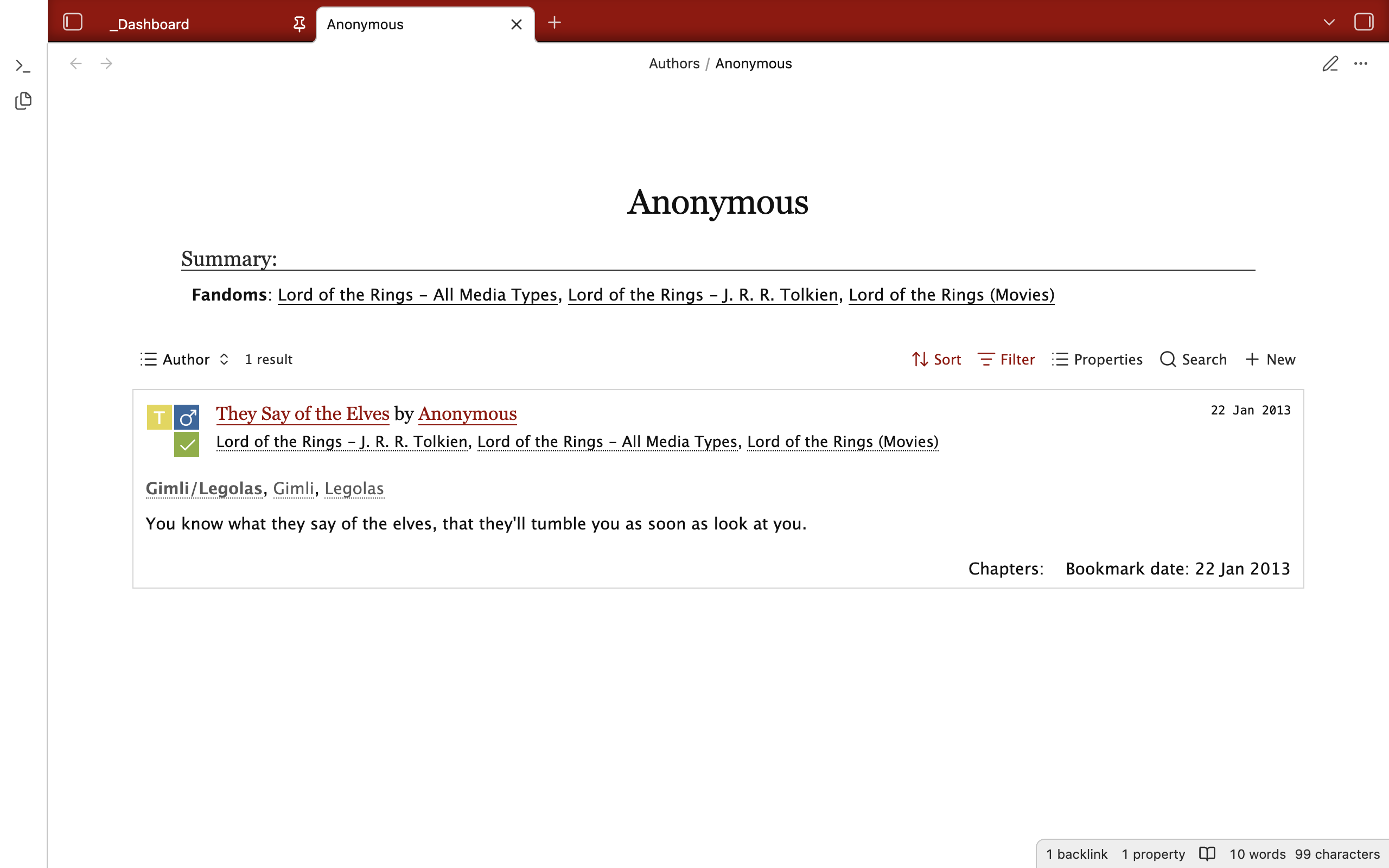
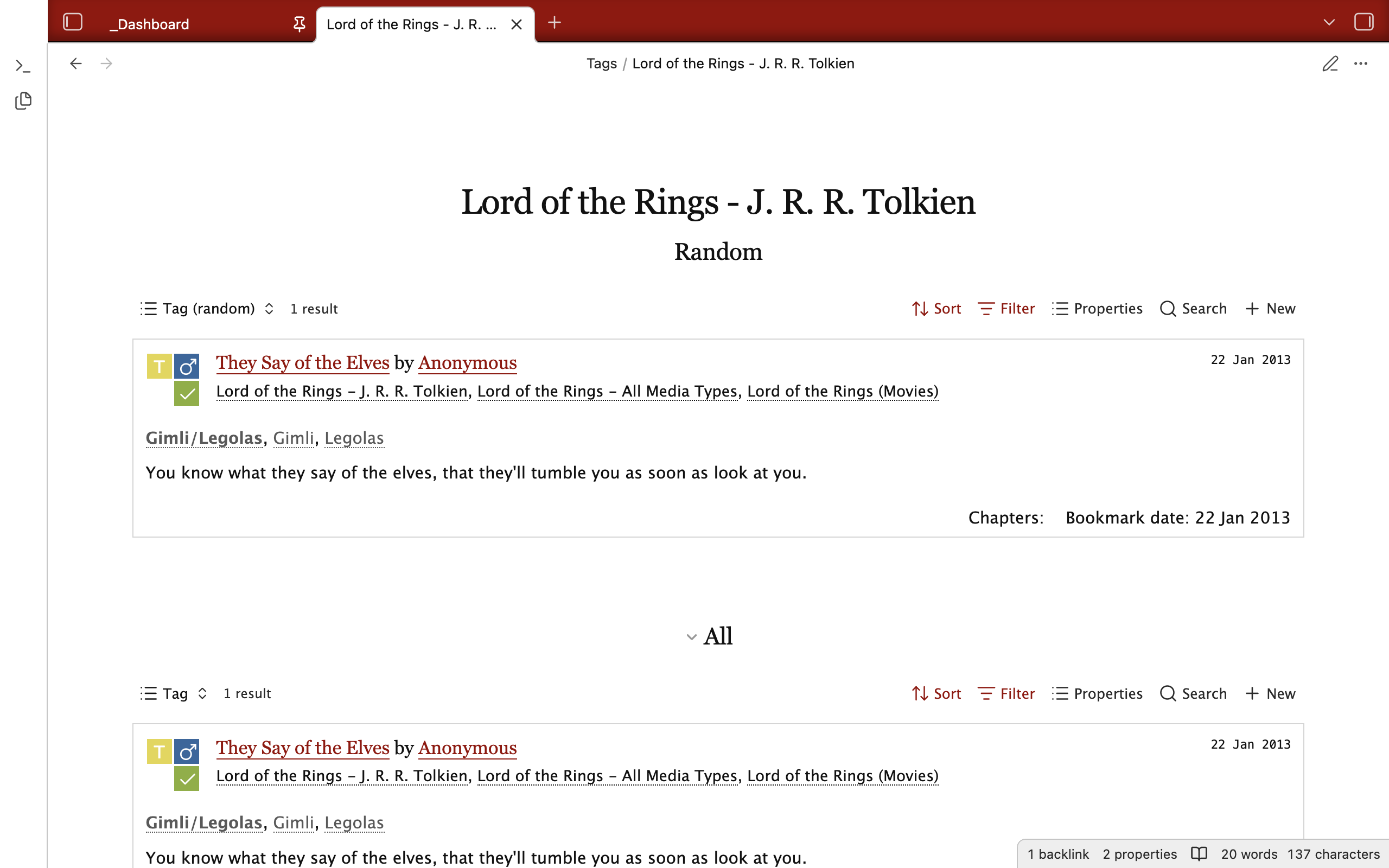
- Tag and author pages: The script turns all tags and author names into valid Obsidian links, which means that all you have to do to create a page for a tag or author is click the link and apply the appropriate template to the newly created page.
- Journal pages: See all the bookmarks you saved in a given month or year.
- Custom, saveable queries: AO3's tag features are awesome and you can do a lot of filtering on the site itself. However, there are still some things you can do with the databases on Obsidian that you can't do on AO3—the ones I have included here are an "On this day" feature, which pulls up any bookmarks made on this day in a previous year, and a randomizer, which will select one random fic from your bookmarks or from a tag or date range. Also, if you have a particular filter you use all the time, you can save the query so you don't have to put in the details repeatedly.
- Identify deleted/hidden works: You can't really do anything about it, but I like knowing anyway.
Illustrations
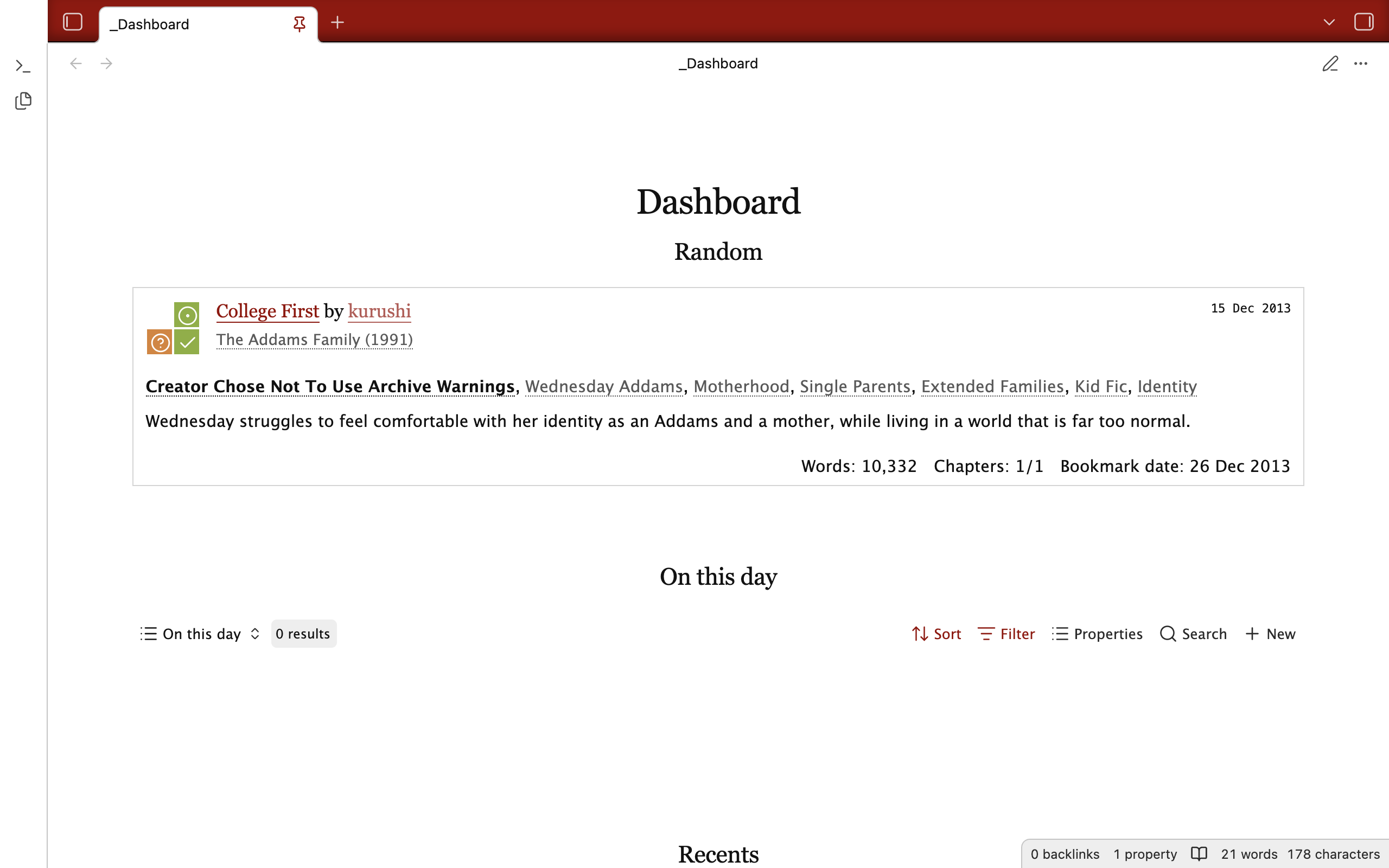
Dashboard
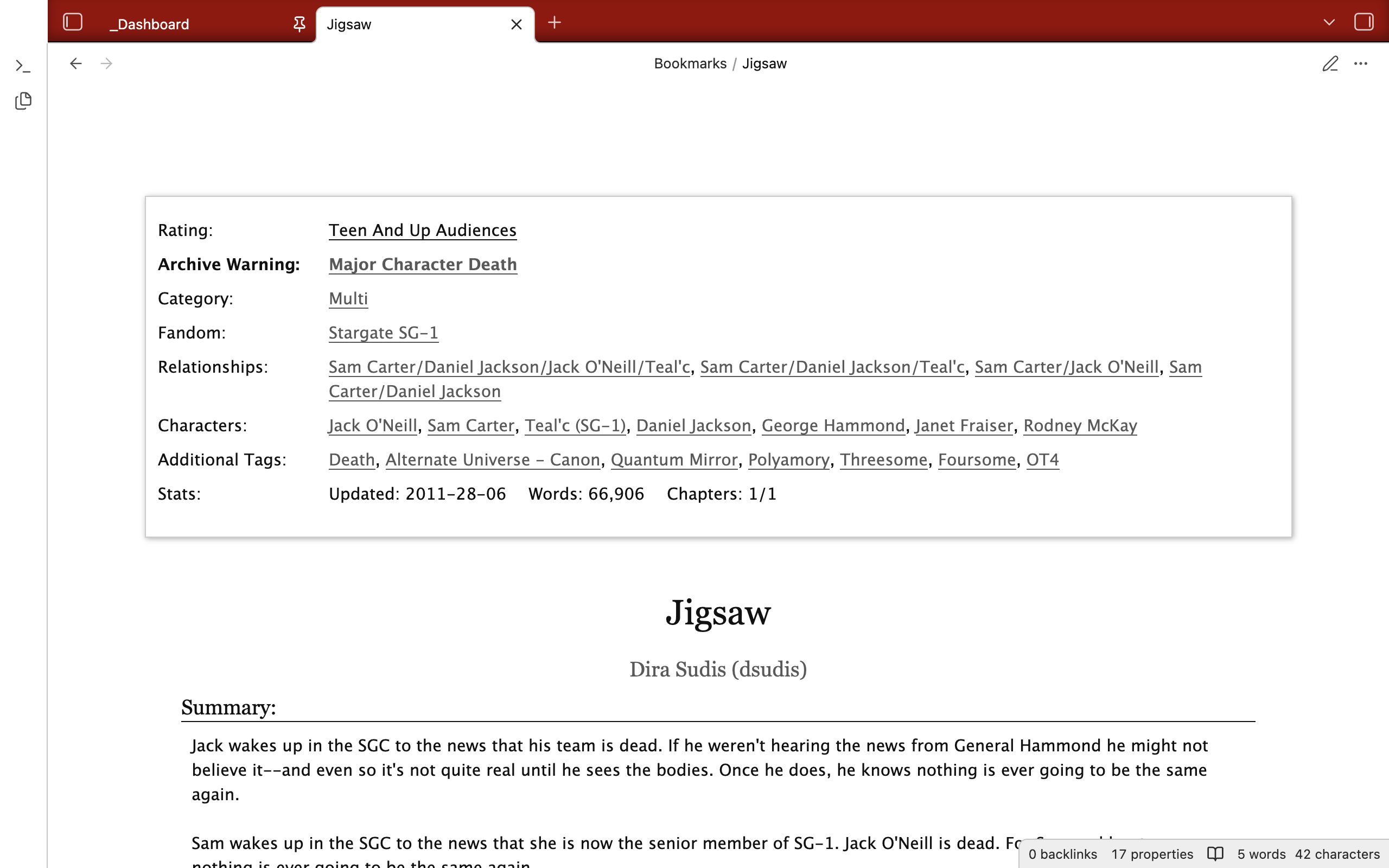
Bookmark
Author
Tag
Obsidian
At its most basic, Obsidian is a notetaking app.
It works with a folder (which they call a "vault", but it's just a folder), primarily populated by a type of file called Markdown files (.md). Markdown is a language for formatting plaintext. It is meant to translate easily into HTML, which is the most common language for serving content over the internet.3
There are a number of fun things about this setup. One is that your files are yours to do with as you wish—you can edit them in other programs (I, for example, frequently use VSCode's relatively more powerful Regex search and replace to change files in batches) and back them up the way you would back up other files.4 Additionally, if Obsidian ever stops working or if you decide you want to stop using it for whatever reason, you lose the specific functionality enabled by the app but you don't lose the content of your notes.
This tutorial relies on three of Obsidian's features:
- Linking: Obsidian lets you link from one file to another based on either the title of the note or its path (i.e. its location on your computer relative to the folder). You can do this with either traditional Markdown links (
[display text](path)) or Wikilinks ([[path]]or[[path|display text]]). You can also link to uncreated notes; then, when you create a note with that title, it will already be linked to all the files in which you used the link. - Extensibility: Obsidian allows users to write third-party plugins, either for personal use or for sharing with others. You can also style the app with custom CSS; Obsidian allows both full themes and smaller "snippets" of code.
- Database queries: Obsidian stores your notes and some basic data about them (e.g. title, number of links, and custom properties from the YAML frontmatter) in a database, and has recently introduced a native feature capable of querying that database, called Bases.5
With regards to the extensibility of the app, I've made it so this vault in particular works without any third-party plugins. This is not a reflection of the original vault I personally use for my actual bookmarks, which uses four,6 but instead of the fact that I understand downloading anything from anyone but especially a complete stranger is a security risk. By reducing the number of moving parts, I'm trying to reduce that risk as far as is possible for the scope of the project.
The app does use my custom CSS theme, "Archive", and a CSS snippet, "Bases", but CSS is a relatively much less powerful language than Python7 and poses much, much less of a security risk. Basically, the snippet makes the Bases, especially the bookmarks, look right and the theme makes everything look like AO3 specifically. If you're not interested in replicating the AO3 look, you could use the app's default theme or any one of the hundreds of community-created themes. I would strongly recommend using the "Bases" CSS snippet, though.8 You could use the vault without either the theme or the snippet and still get the function entirely, but you'd probably want to do some reworking of the Bases and honestly, the whole thing wouldn't look as cool.
Other things you could do with this code
I set up this vault this way specifically for the purposes of this tutorial. Here are some other ideas for either extending the project or using parts in isolation:
- You could use the theme "Archive" in an Obsidian vault for your own writing or whatever else.9 Go ahead, make your class notes look like AO3.
- You could store full-text copies of fics in your vault,10 either:
- as Markdown text directly in the bookmark files you've created,11 or
- as EPUBs, PDFs, etc. in a folder. Recall that the "vault" is just a folder on your computer—you can put whatever you want in there. Obsidian won't read any of the filetypes AO3 makes available to download natively, but you can get plugins that will let you open them in the app or you can just use whatever app you already use.12
Known issues/annoyances/quirks
- Some features of this make certain pages laggy as hell. There are a handful of things I do that really stretch the capacity of Bases in particular13 and so tag pages especially can take a hot second to load.
- Bases is also a relatively new feature and has some issues itself. It's pretty much stable, but will on occasion do weird things like fail to load completely or load all entries in the same spot as a weird congealed blob. The best solution I've come up with for any of this is to reload the page (using the "Reload app without saving" command) and hope for the best.
- Tags do not arrive pre-wrangled. If you want things tagged "Canon Divergence" and things tagged "Alternate Universe - Canon Divergence" to appear on the same tag page, you've got to combine them yourself. I wrote a script to make this easier, but you still have to define the tag and its aliases.
- Authors do arrive pre-wrangled. I prefer to have all the pseuds of a given author link to the same author page, so that's how I wrote the code. If you don't prefer this, then you're going to have to edit the code or to fix everything by hand.
- I don't preserve engagement data like number of hits or comments on bookmark pages even though Flamebyrd's script downloads them. I figure these numbers change enough to make them obsolete pretty much immediately upon download.
- Flamebyrd's script records the number of chapters in a bookmarked work but not the number of works in a bookmarked series, so for series bookmark pages, you have to fill out the "parts" property by hand.
- The CSS for the different types of Bases is based on the order of the properties; if you change the order of the properties, including by adding or removing properties, the CSS will break and everything will look weird.
Tutorial
Download bookmarks
- Flamebyrd's bookmarklet is here.14 Follow their instructions to download your AO3 bookmarks to CSV files.15
- Strictly speaking, you could download anyone's bookmarks, not only your own. You also don't have to be signed in unless you want to download your private bookmarks. Basically, as long as you are able to see the bookmark in your browser when you run the script, you'll be able to download its data.
- If you are like me and have about a million bookmarks, at some point in the cycle of download/next page/download/so on, you might trigger anti-bot security measures. In my experience, pausing for a few minutes and coming back to it worked just fine.
Download sample vault
- The files you need are available for download on GitHub. Download them using the green button reading
<> Code; select the "Download ZIP" option. - You now have the files you need as a ZIP archive; unzip them and move the resulting folder to wherever you want to keep it on your computer in the long-term. (Mine, for example, lives on my desktop in a folder called
Archive/Obsidian.) If you want to rename the file/vault, this is the moment to do that too. - Move the CSV files that you got from Flamebyrd's bookmarklet to the
_Code/Assetssubfolder.
Download and set up Obsidian
- Install Obsidian from here.
- When you get the vault selection screen, pick "Open file as vault" and select the
Bookmarksfolder. - Take a moment to explore the example vault (the sample bookmarks are not mine but Astolat's—I had way too many for simple illustration purposes). Fun features include:
- Author, bookmark, and tag pages
- Dashboard with "Random", "On this day", and "Recents" views
- Obsidian's graph view, which shows a visual representation of the links between files in the vault—more info here.
- Once you're done, delete the files in the folders
Authors,Bookmarks, andTags,16 but not the folders themselves.
Populate with your bookmarks
- Run the program
Update.pyin the_Codesubdirectory.- Note that you should be running the code from your
Bookmarksdirectory, not the_Codesubdirectory.
- Note that you should be running the code from your
- Either everything will go to plan, in which case you'll get a message telling you how many bookmarks were imported, whether the import included any deleted bookmarks, and if so how many, OR you will get one of the following messages:
- ERROR: No new CSV files to read in _Code/Assets: Either there were no CSV files in the folder or all of them had already been processed and recorded in
Reference.csv. - ERROR: No new bookmarks to import: All entries in all CSV files in the
_Code/Assetsfolder are either deleted/hidden or inReference.csv. - Any other error message: Congratulations! You have managed to produce a situation that I didn't encounter or foresee when writing the code. Please tell me about it; I'm happy to help troubleshoot.
- ERROR: No new CSV files to read in _Code/Assets: Either there were no CSV files in the folder or all of them had already been processed and recorded in
Additional steps
At this point, if the import went well, you're done with the main set-up. Everything else is a sort of choose-your-own-adventure situation.
Author and tag pages
- Click on the link for an author or tag in a bookmark.
- Apply the appropriate template and move to the appropriate folder.
You don't have to make these for every tag or author—for example, I've only made author pages for authors who are friends/favorites of mine or who've written four or more fics in my bookmarks. On the flip side, there's no particular reason you couldn't make a page for every tag or author; it just seems like it would be kind of a pain and not that useful, especially for more editorializing-type tags. Like, one of my bookmarks is tagged "Garak Can't Pick His Feelings Out of a Police Lineup and that's Very Valid of Him" and I just don't think that's going to come up a second time.
Tag management
I've included features that enable two types of tag management: tag wrangling and tag hierarchies.
- Wrangling about identity. In this process, you're giving a tag aliases and saying that they are, in effect, the same thing. This is useful for e.g. "Alternate Universe - Canon Divergence" and "Canon Divergence"—different ways of saying the same thing, which you'd want to show up on the same page.
- Hierarchies are about set and subset. By defining a tag as the "archetype" for another, you are saying that former includes, but is not identical to, the latter. This is useful for e.g. "Alternate Universe" and "Alternate Universe - Canon Divergence", where you'd want anything tagged "Alternate Universe - Canon Divergence" to show up on the "Alternate Universe" tag page but not vice versa.
Tag wrangling
This process does not require creating a page for the tag or any of its aliases. With this program, you can set multiple aliases for a tag, but one alias cannot be assigned to multiple tags—that sort of thing would have to be done by hand.
- Run the program
Wrangle.pyin the_Codesubdirectory. - You will be prompted in the terminal to choose between updating all existing bookmarks with all existing aliases (
0) or adding a new alias (1).- If you input
0to update all existing bookmarks with all existing aliases, the code will run and all tags will be updated across any files in yourBookmarkssubdirectory. - If you input something other than
0or1, you will get an error message. Just run the code again from the start.
- If you input
- If you add a new alias, you will be prompted for:
- Tag: The base tag to which you want all aliases to link. This can be a tag you've already wrangled; any aliases will be added to the list of aliases for the tag.
- Aliases: Any aliases you wish to wrangle. Input these as a comma-separated list.
- The program will report in the terminal whether any of the aliases (a) have their own aliases or (b) are already an alias of a tag, in which cases the alias in question will not be wrangled. Otherwise, the program will inform you that the alias is now an alias of the given tag.
- If you have one or more valid aliases to be wrangled, the program will update all bookmarks, then report back (a) how many aliases were added and (b) how many tag instances were wrangled total across all aliases.
- Possible error messages:
- ERROR: {{ALIAS}} has aliases of its own: The given alias was already a tag with aliases.
- ERROR: {{ALIAS}} is already an alias: The given alias was already an alias of a tag.
- ERROR: {{INPUT}} was not an option: There are two mode options,
0and1. Whatever you typed was not one of those options. - ERROR: No new aliases: Either you didn't input any aliases or all of them were either already an alias or already a tag with aliases in its own right.
- ERROR: No tag input: You forgot to input a tag.
- Any other error message: Congratulations! You have managed to produce a situation that I didn't encounter or foresee when writing the code. Please tell me about it; I'm happy to help troubleshoot.
Tag hierarchies
This process does require creating a page for at least the subset tag. A tag can have multiple archetypes.17
- Each tag page has a property labeled "archetype". This is for marking the tag of which the current page is a subset.
- For example, I have a tag page for "Alternate Universe - Fusion", and I've marked "Alternate Universe" as the archetype. This means that on the page for "Alternate Universe", I see not only bookmarks tagged with "Alternate Universe" and the various aliases I have wrangled (e.g. "AU"), but also the ones tagged with "Alternate Universe - Fusion" (even if they don't themselves have a separate "Alternate Universe" tag).
- The filters I've set up only allow for five layers of nesting before things stop showing up in the results. I would recommend limiting your hierarchies to six levels rather than expanding the formula, though you could do that too—at a certain point, things just start taking too long to load.
-
Tl;dr: you really probably shouldn't, but I can't actually stop you (hence the disclaimer). ↩
-
Again, worst thing that happens if not is you'd have to input the data by hand. ↩
-
To oversimplify, the internet runs off three languages: HTML to serve content, CSS to style content, and JavaScript for reactive elements and scripting. ↩
-
Or if you're a person who's into LLMs, you can feed your entire life's work into the agent of your choice with relative efficiency. I don't recommend this for any number of reasons, but if you look up anything about Obsidian, like half the results will be AI dudebros talking about how to optimize this process, so I did feel the need to mention it. ↩
-
There are third-party extensions that allow similar querying capabilities, but this tutorial is just going to use Bases, so no need to worry about the other ones. ↩
-
For the record, in order of decreasing utility: Templater, Linter, Folder Notes, Open in VSCode. ↩
-
To the point where there's a debate among programmers as to whether it's fair to call CSS a language at all. (The debate is, for the record, kind of a toxic cesspool of misogyny, but it does exist.) ↩
-
If you want to see what things would look like without it, there's a toggle at the bottom of the "Appearance" page in settings; you can toggle it on and off to see the difference. ↩
-
Writing for AO3 in Obsidian is actually remarkably convenient, because Markdown translates easily and reliably to HTML. I'm writing this tutorial in Obsidian right now, actually—once I'm done, I'll use a Python script to convert the Markdown file to HTML and then copy/paste that directly into AO3. ↩
-
I do this. I didn't include it as a feature in the example vault because I didn't want to publically distribute copies of other people's fic; I'm happy to talk about the mechanics with anyone who's interested, though. ↩
-
Would recommend capping out at maybe, like, ten thousand words or so in a file? More than that and things start getting laggy. Anyway, the most convenient way to get the Markdown version of a fic is to download the HTML version and convert it to Markdown (this is what the "Markdown" script in the code folder does). ↩
-
Actually, I think with some fussing around, you could probably make it so that you could link to HTML files that would open in your browser—basically a mini offline AO3 with just your bookmarks. I haven't actually bothered to work out the specifics, but it sounds cool as hell. ↩
-
Specifically, Bases formulae are not especially well-developed or powerful and on top of that, I had particular goals in mind when I was working that were not really meant to be in the scope of the format. This means that some things are janky and just generally inefficient. ↩
-
Like with Python, you probably shouldn't be running JavaScript scripts from random internet strangers without taking a look at the code to make sure it's not doing anything weird. Here at least you have my (inexpert) corroboration that I've looked at Flamebyrd's code and it seems to do what it says it does and nothing else, but still, be cautious with this stuff. ↩
-
CSV stand for "comma separated value"; basically, a CSV file is a table in plaintext, with the column distinctions marked by commas. You should be able to open and edit CSV files in the spreadsheet app of your choice. ↩
-
I mean, you could leave them, but they're probably not super useful to you apart from their illustrative purposes. ↩
-
For example, I usually set relationship tags to have any involved characters' tags as archetypes, to account for cases in which authors tag a relationship and then don't tag the characters themselves. ↩