
Chapter Text
Preview images
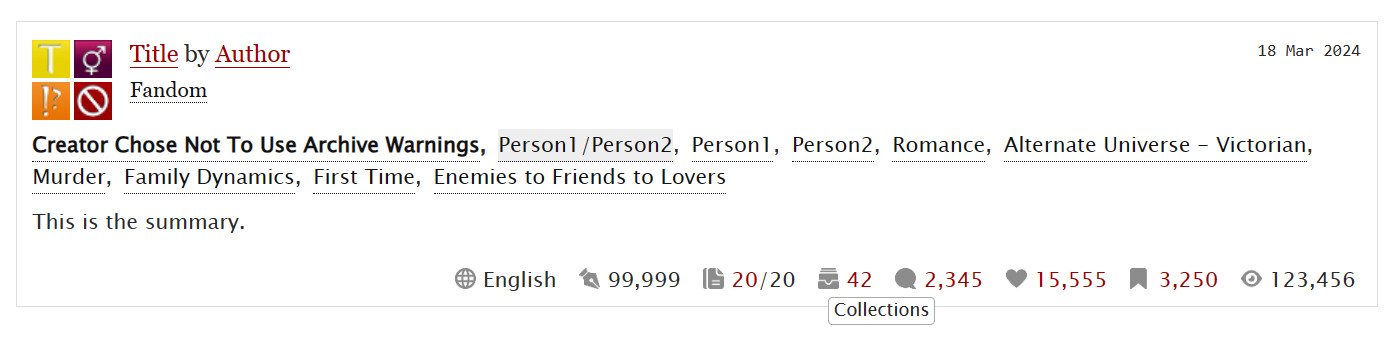
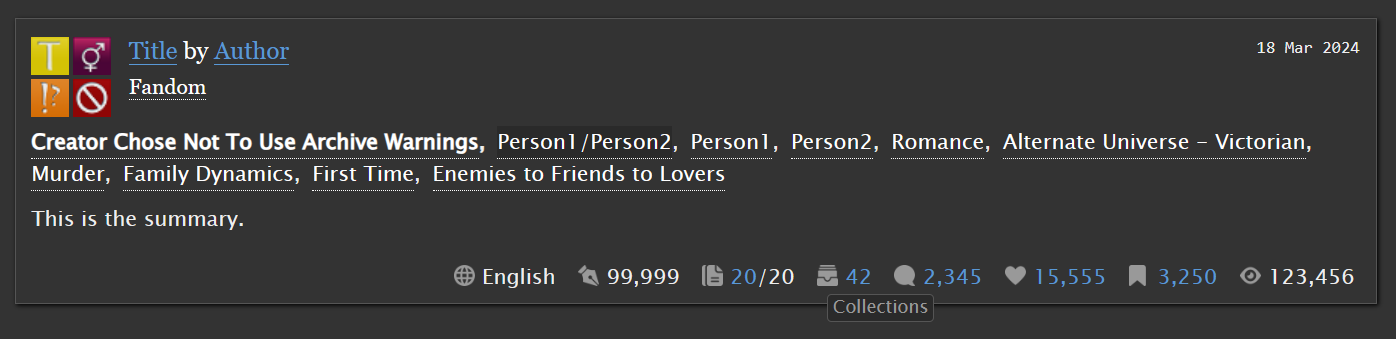
The preview images here show the icons for works and the hover text for collections.
See chapter two for more "interactable" previews for almost all icons (for works, series, collections, tagsets and the statistics page).
Light mode (AO3 default skin):
Dark mode (Reversi):
The CSS code
- Light mode version
- Dark mode version (optimized for Reversi)
How to install the skin
- Go to My Dashboard → Skins → Create Site Skin
- Give the skin a unique title like "Stats Icons by Zerafina - [your user name]"
- Copy the code (linked above) and paste it into the CSS field
- Optional, if you want to add the icons to another skin like Reversi:
- Click on Advanced Show
- Click Add parent skin, type in the name of the other skin and select it
- Click Submit
- Click on Use and you're done!
How to change the icon colors
Find this line of code:
filter: invert(79%) sepia(0%) saturate(14%) hue-rotate(185deg) brightness(87%) contrast(87%);
Here I used CSS filters to turn the icons, which are actually black, to gray. Now you have to change the filter values to get the color you want. But don't worry, you don't have to figure them out by yourself! I recommend using a tool like the CSS Color Filter Generator that generates the code for you. You just have to enter the color that you want the logo to have (as a hex or rgb value). Once your code has been generated, you can use it to replace the line of code shown above.
Click here to see some code examples (for pink, red, blue or light gray icons)
Pink (#ec137a):
filter: invert(45%) sepia(96%) saturate(7491%) hue-rotate(320deg) brightness(93%) contrast(99%);
"AO3 red" (#900):
filter: invert(8%) sepia(99%) saturate(6083%) hue-rotate(15deg) brightness(88%) contrast(115%);
"Reversi blue" (#5998d6):
filter: invert(53%) sepia(99%) saturate(287%) hue-rotate(170deg) brightness(88%) contrast(88%);
Light gray/almost white (#eee):
filter: invert(100%) sepia(10%) saturate(102%) hue-rotate(163deg) brightness(114%) contrast(87%);
Customization tips and troubleshooting
- I commented the code in a lot of places to make it easier to customize. Please be aware that these comments get deleted after you have saved the skin on AO3 so I recommend pasting the code into a CSS file first.
- If you don't want the tooltip/hover text, you can just delete the part of the code starting at "STATS HOVER TEXT".
- Important note for FIREFOX USERS: The code may not work in some places if your browser is an older version. If some of the icons don't show up, try installing a newer Firefox version. You can take a look at the "live" previews in the second chapter to test this.
Updates
- 10 July 2024: Fixed an issue where the wrong bookmark icon was displayed for works in collections. I also shortened the code a little bit.
- 21 July 2024: Fixed an issue where the wrong "Collections" tooltip was displayed in some places. Made some adjustments to the way the tooltips are styled and positioned.
- 7 August 2024: Updated the code so that you can now change the colors of the icons by using CSS filters! The opacity property, with which the symbols could be made lighter or darker, was therefore no longer necessary, so I removed that part of the code.
- 13 October 2024: AO3 updated the HTML code for stats in some places. This made a few parts of my CSS code obsolete, so I deleted them.
I also created a Github repository to make it easier to share and modify the code. Future updates will probably no longer be described here in detail because they can be tracked in the repository. But I will still include the date of the last update in the description.